

Table of Contents
The Widgets section allows you to add and manage content blocks in various areas of your site, such as sidebars, footers, and WooCommerce pages.
1. Access Widgets Settings #
From your WordPress dashboard, navigate to:
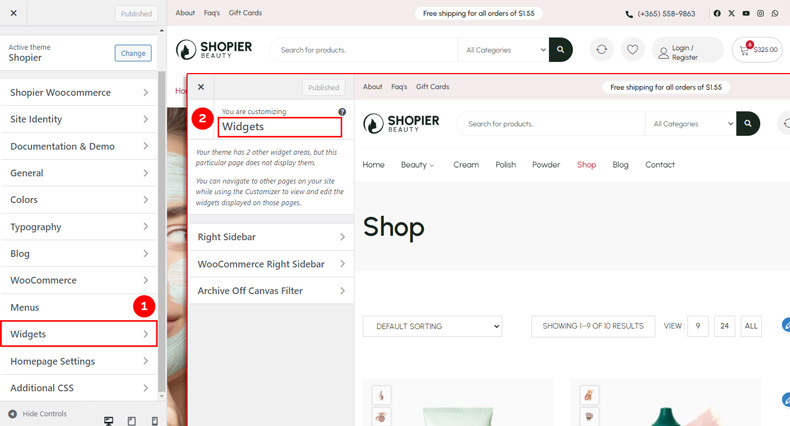
Dashboard → Appearance → Customize → Widgets
2. Explore Widget Areas #
Inside the Widgets panel, you will find different widget areas where you can place widgets.
Example:
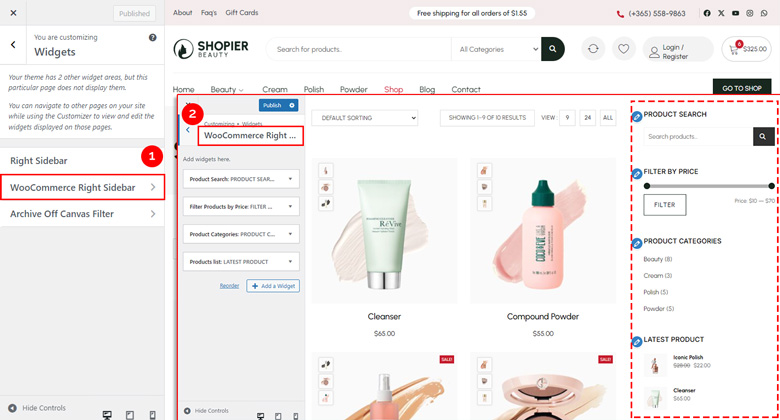
- WooCommerce Right Sidebar – Add widgets that appear on WooCommerce pages.
3. Add or Manage Widgets #
- Drag and drop widgets into the desired widget area.
- Configure each widget’s settings as needed.
4. Save Your Changes #
- Preview changes in real time.
- Click “Publish” to save them to your website.


