

Table of Contents
Follow these simple steps to edit and personalize your imported starter pages using Elementor:
1. Go to Pages #
From your WordPress dashboard, navigate to Pages.
You will see a list of all available pages on your website.
2. Select the Page to Edit #
- Hover over the page you want to customize.
- Click Edit with Elementor.

3. Alternative Method to Access Elementor #
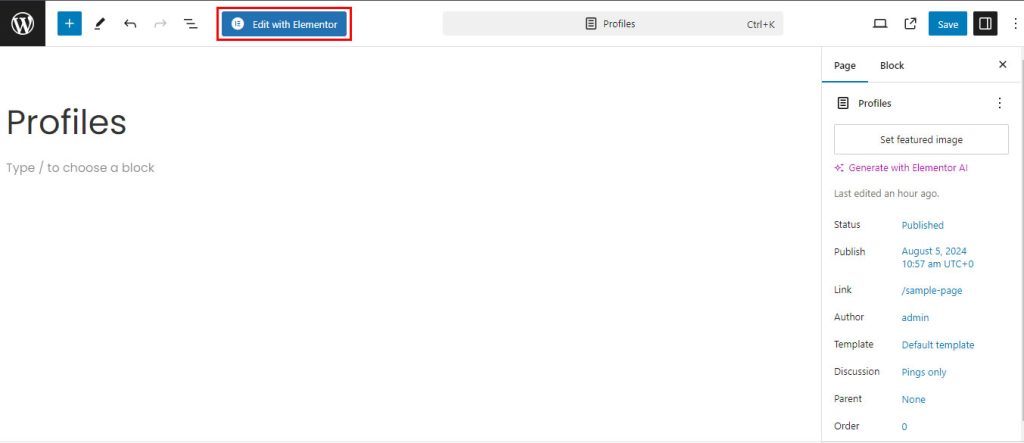
If you cannot find Edit with Elementor:
- Click on the page you want to edit.
- In the page editor, locate and click Edit with Elementor at the top of the screen.
4. Open Elementor Editor #
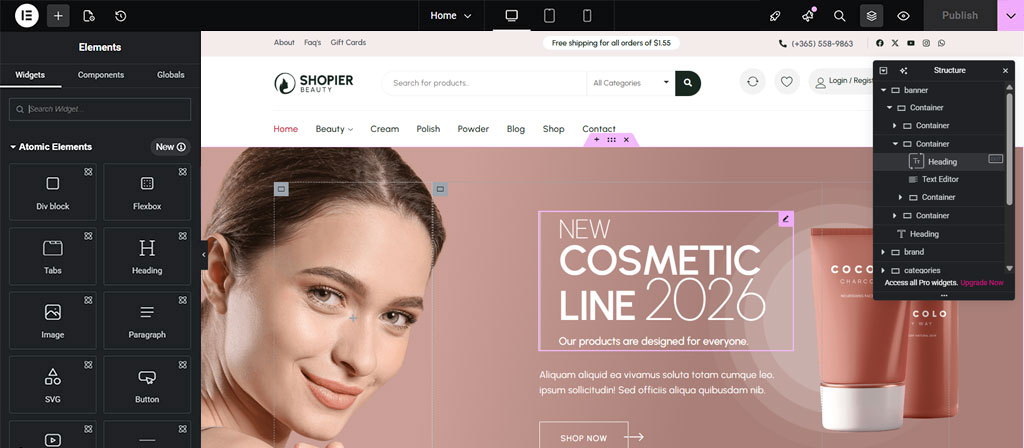
- You will be redirected to the Elementor page builder interface.
- This is where you can visually edit your page.
5. Customize Your Content #
- Click on any section, column, or widget to edit it.
You can:
- Change text and images
- Add new elements (buttons, headings, videos, etc.)
- Adjust layout, spacing, and colors
6. Update Your Changes #
- Once you are done editing, click the Publish button .
- Your changes will be saved and reflected on your website.


