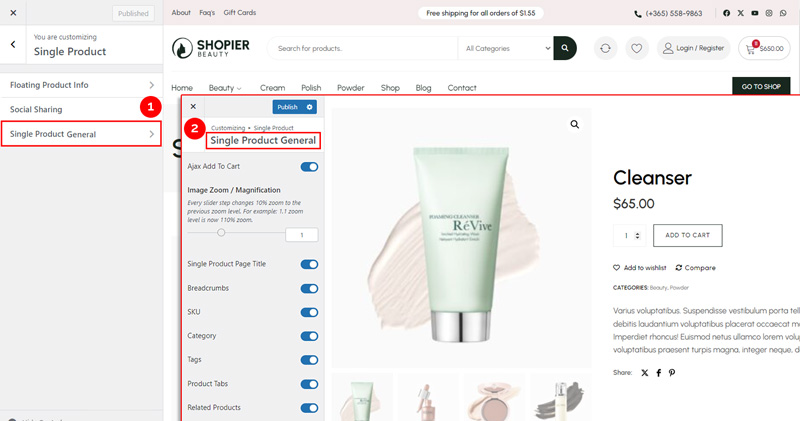
To configure the Single Product General settings, follow these steps:
1. Navigate to Single Product General #
- From your WordPress dashboard, go to:
Dashboard → Appearance → Customize → Shopier WooCommerce → Single Product → Single Product General
2. Available Options #
Inside the Single Product General section, you can configure the following:
- Image Zoom / Magnification
Enable zoom or magnification on product images for better viewing. - Single Product Page Title
Show or hide the product title on the single product page. - SKU
Display or hide the product SKU. - Category
Show or hide the product category. - Tags
Show or hide product tags. - Product Tabs
Manage product tabs like description, reviews, and additional information. - Related Products
Enable or disable related product suggestions on the single product page.
3. Save Your Changes #
- Preview changes in real time.
- Click “Publish” to apply them to your website.