

Table of Contents
To configure your shop/archive pages in the Shopier theme, follow these steps:
1. Navigate to Archive / Shop Settings #
- From your WordPress dashboard, go to:
Dashboard → Appearance → Customize → Shopier WooCommerce → Archive / Shop
2. Archive / Shop General Panel #
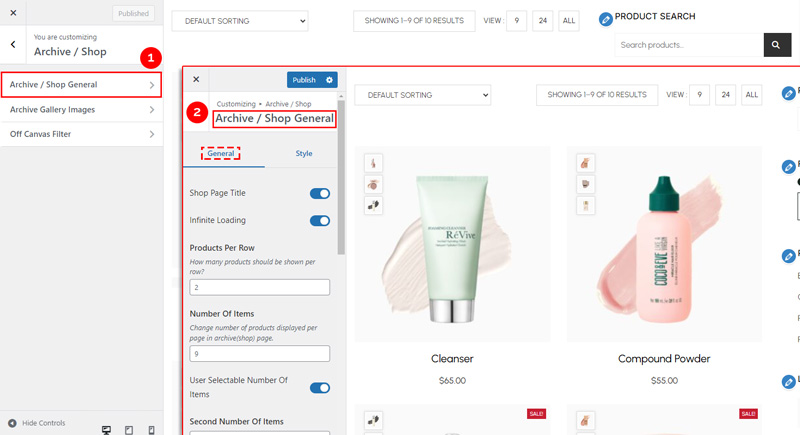
The Archive / Shop General section is divided into General and Style panels.
General Panel Options #
Use these settings to manage layout and functional behavior:
- Shop Page Title
Show or hide the page title on your shop/archive pages. - Infinite Loading
Enable or disable infinite scrolling for product listings. - Products Number Options
Set the number of products displayed per row and per page. - Product Wrapper Options
Adjust the layout and spacing of product containers. - Add To Cart Button Options
Control the display of the Add to Cart button. - Sales Tag Options
Enable or customize sale tags on discounted products.
3. Archive / Shop Style Panel #
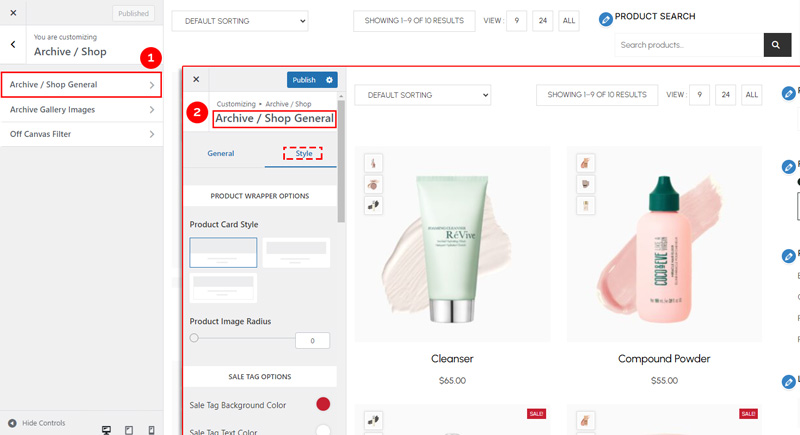
The Style Panel lets you customize the visual appearance of your shop/archive pages.
Style Panel Options #
- Product Wrapper Options
Adjust spacing, borders, background, and overall styling of product containers. - Sales Tag Options
Customize the look of sale tags, including colors, size, and position. - Product Title Options
Set typography, color, and spacing for product titles. - Product Price Options
Customize how product prices are displayed, including font, color, and style.
4. Save Your Changes #
- Preview all changes in real time.
- Click “Publish” to apply them to your website.


