

Table of Contents
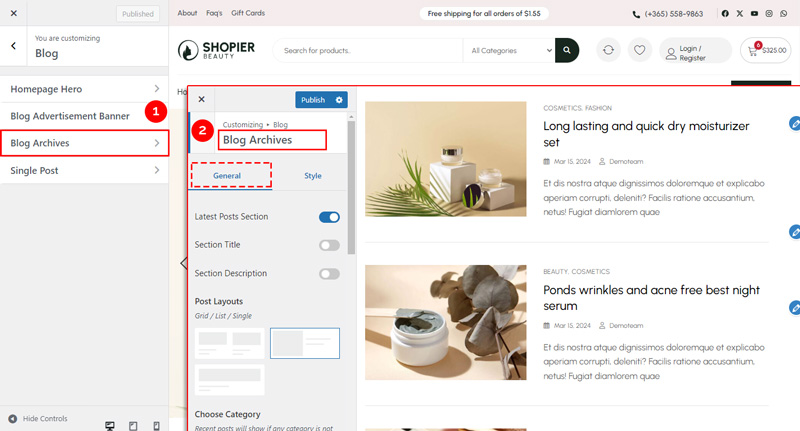
The Blog Archives section allows you to customize the layout and style of your blog listing pages, including post sections, categories, and buttons.
1. Access Blog Archives Settings #
From your WordPress dashboard, navigate to:
Dashboard → Appearance → Customize → Blog → Blog Archives
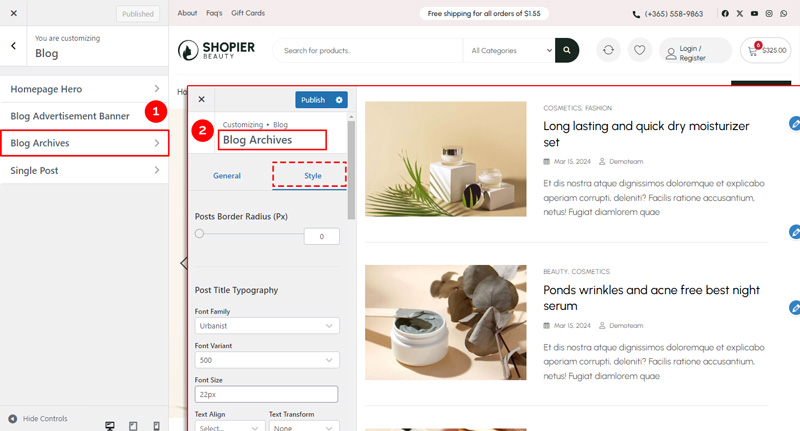
The section is divided into General and Style panels.
2. Explore Available Options #
General Panel Options #
- Latest Post Section Options – Toggles to show/hide latest posts.
- Section Title Options – Set or customize the title of the blog archives section.
- Section Description Options – Add or edit the description text for the section.
- Post Layout Options – Choose the layout for displaying posts (grid, list, single etc.).
- Blog Archive Options – Configure show and hide page titles.
- Post Button Options – Customize “Read More” or other post buttons.
- Responsive Options – Control how blog archives appear on mobile and tablet devices.
Style Panel Options #
- Section Style Options – Customize background, spacing, and borders for the section.
- Post Style Options – Adjust colors, typography, and spacing for individual posts.
- Post Button Style Options – Style buttons with colors, fonts, and hover effects.
3. Save Your Changes #
- Preview changes in real time.
- Click “Publish” to save them to your website.


